The 4-Tool Faceless YouTube Stack, Wired End to End
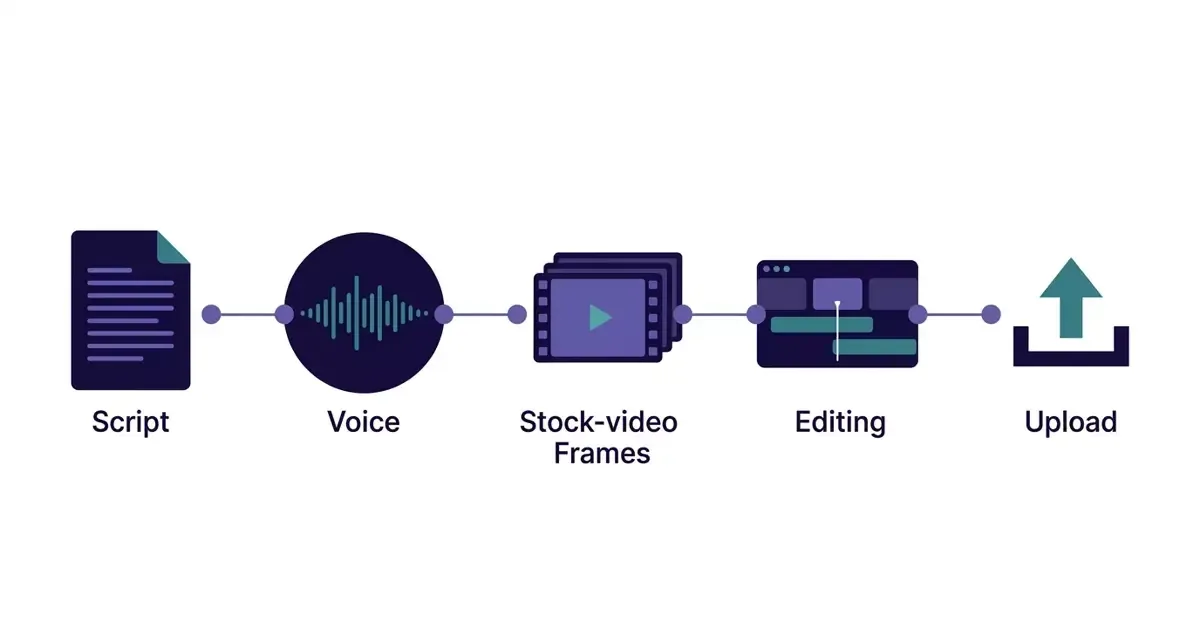
TL;DR: Four tools cover the core jobs in the faceless YouTube stack this post walks through: Claude for scripts, ElevenLabs for voice, Pexels for visuals and one reusable CapCut template for the edit. An X user relayed the stack from a friend's channel in June 2026. The $24K a month attached to it is a secondhand, unverified claim.
Most faceless-channel "tool stack" posts hand you a menu. Fifteen tools, a star rating each, and no idea how they actually connect. You finish reading and still don't know what to open first.
This one is the opposite. One X user posted a friend's entire faceless YouTube stack, scripting to upload(opens in new tab), and it's four tools doing four jobs in a fixed order. The post says the channel earns $24K a month in ad revenue. That number is a claim in the post, relayed secondhand from a friend of the poster, and we'll treat it that way. Below, "the creator" means that friend, and the X user is passing on what he said. The workflow underneath it is concrete and copyable. So let's wire it together start to finish.
The whole stack is four tools and one rule
Here's the answer up front: scripting goes to Claude, voice to ElevenLabs, visuals to Pexels, the edit to a single CapCut template. The rule that ties them together is build the template once, reuse it forever. That's the entire system.
The X user who shared it (@X_FIRSTBOSS, June 2026(opens in new tab)) relays the friend's figures: about 75 minutes per video, four videos a week, and $58 a month in tool costs, with the channel past 100K subscribers in month seven. Take the income figure with appropriate salt: the post ends with an offer to DM you an ebook to buy, which is exactly the incentive to make a stack sound more turnkey than it is. The tools and the order check out. Each one is a real, active product you can sign up for today.
What makes this different from a tools roundup is that nothing here is optional or interchangeable in the moment. You're not choosing between eleven voice generators. You're moving one script through one pipe. Here's each stage.
The pipeline as the creator described it: each tool owns one job and hands off to the next.
Step 1: Scripting with Claude (the part that decides everything)
Start with the script, because a faceless video is a voiceover with pictures, and the voiceover is the script. Get this wrong and no amount of clean editing saves it.
The creator's method is worth copying exactly: he feeds Claude five to ten scripts that already performed well in his niche, tells it to treat them as structural references, then asks for new scripts on new topics in that same shape. He reported about 12 minutes per script this way. The insight most people miss isn't "use AI to write." It's use your own winners as the pattern. You're not asking a model to be creative. You're asking it to clone a structure that already works on YouTube, which is a much easier job to do well.
A faceless channel, for the record, is one where you never appear on camera or use your own voice; the audience bonds with the format, not a face. That constraint is exactly why the script carries so much weight. Write it in spoken rhythm, not essay prose. Short lines. One idea per sentence. Read it out loud before it goes anywhere near a voice generator, because anything that trips your tongue will trip the AI voice too.
Step 2: Voice with ElevenLabs (clone once, reuse forever)
Generate the voiceover next, before you touch a single visual. The audio is your timeline; the pictures get cut to fit it, never the other way around.
ElevenLabs is the tool here, and the move that matters is doing the voice setup once. The creator cloned a single voice and has used that same one on every video since, for brand consistency. He put the cost at $22 a month for his volume. This is the template principle showing up early: you make one durable decision (this is the channel's voice) and then you stop deciding. Every new video inherits it.
One honest caveat on platform mechanics. AI voiceover quality and YouTube's tolerance for it both shift, so an AI voice that reads as natural today is a moving target, not a settled fact. If you want it to actually sound like a person rather than a text-to-speech demo, we wrote a whole piece on faceless voiceover that doesn't sound like slop: the short version is that pacing and punctuation in the script do more work than the voice model itself.
Step 3: Visuals from Pexels (and where stock runs out)
Once the audio exists, you know its exact length and beats, so visual sourcing becomes a fill-in job. The creator pulls mostly free Pexels stock footage and reaches for AI-generated images only when stock can't cover a specific shot. He reported about 25 minutes of sourcing per video.
That 25-minute figure is the honest one to sit with. It's usually the second-biggest time sink after editing, and the step where a "fully automated" fantasy meets reality. Stock footage is generic by nature, so two faceless channels in the same niche pulling from the same Pexels library start to look identical. The fix isn't more tools; it's a point of view. Decide what your channel's visuals always do (always B-roll over the hook, always one custom image per main point) and that consistency becomes recognizable instead of generic.
One operator's reported times. Treat these as his log, not a benchmark; your numbers will differ.
Step 4: Editing with one CapCut template (the step that makes it repeatable)
Build your edit once. This is the step that turns a hobby into a repeatable process, and it's the one most people never finish.
The creator built a single CapCut template and reuses it for every video: drop in the new voiceover, drop in the new visuals, done. He reported about 35 minutes of edit time per video. Notice that's the longest single step even with a template, which tells you how brutal editing from scratch would be. The template isn't a shortcut. It's the channel's entire production identity baked into a reusable file. Same captions style, same cut rhythm, same transitions, every time.
Script in one app, voice in another, visuals in a third, edit in a fourth: every handoff here is a manual export and re-import, and the drift it causes is invisible at first, showing up gradually once nobody remembers which caption font or pacing choice they used a few videos back. We priced that seam tax in our tools comparison. A platform like ViralFaceless(opens in new tab) runs script, AI images, voiceover and captions as one pipeline instead of four separate apps, and you still download the finished file and post it yourself. If you're already happy bouncing between four tools, the manual stack works fine. A third route is a tool with a ready-made template for each video, which we cover on our Clippie alternative page.
Step 5: Publishing on a schedule (no day-of scramble)
End with distribution, and make it boring on purpose. The creator runs four videos a week, scheduled in advance through YouTube Studio so there's never a publish-day panic. Thumbnails come from a single Canva template: same layout, new text and image, about five minutes each.
The pattern across every step is identical: decide once, repeat forever. Voice, edit template, thumbnail layout, upload cadence: none of these get re-litigated per video. That's what makes the per-video time small. The decisions were front-loaded.
Worth being clear-eyed about the platform side, though. YouTube's treatment of low-effort and AI-assisted faceless content keeps shifting, so a schedule that performs this quarter is a bet, not a guarantee. Consistency helps your odds; it doesn't buy you certainty. Plan as if the algorithm could move, because it does.
What the income claim does and doesn't tell you
The $24K-a-month figure is one X user's secondhand report about a friend's channel, posted alongside a pitch to sell you an ebook. It is not verified data, and you shouldn't plan around it. What survives the skepticism is the system: a fixed four-tool pipeline, every variable templated, roughly 75 minutes of touch time per video once the templates exist.
The creator said the hardest part is month one: building the templates, finding the voice and pacing, learning which topics land. That rings true and it's the part the income screenshot hides. The revenue, if it comes, is downstream of a boring, repeatable machine. The machine is the copyable thing here. The number is just marketing. For what these channels actually earn, see the cash cow YouTube channel FAQ.
FAQ
What tools do I actually need to start a faceless YouTube channel?
Based on the stack one creator shared, four cover the core jobs: Claude for scripting, ElevenLabs for voiceover, Pexels for stock visuals, and CapCut for editing, plus Canva for thumbnails and YouTube Studio for scheduling. You don't need more than that to ship. The gain isn't in adding tools; it's in building a reusable template for each step so every new video inherits your past decisions instead of starting from zero.
Can a faceless channel really make $24K a month?
One X user reported that a friend's channel makes $18-24K a month from AdSense, but that's a secondhand claim posted alongside an ebook sales pitch, so treat it as an anecdote, not a benchmark. Income depends on niche RPM, view volume, and YouTube's monetization rules, all of which vary and change. The reliable takeaway from the post is the workflow, not the revenue figure. Build the repeatable system first; let the earnings be whatever they turn out to be.
How long does one faceless video take with this stack?
The creator reported about 75 minutes per video from script to published, broken down as roughly 12 minutes scripting, 25 minutes sourcing visuals, 35 minutes editing, and 5 minutes on the thumbnail. Those are his self-reported numbers for an established workflow, not an independently measured average. Your first videos will take far longer because you're building the templates; the short per-video time only appears once those templates exist.
Wouldn't picking the single best tool for each step beat a fixed four-tool stack?
For one clip, maybe, but a channel is different: a best-in-class tool for every step still leaves the seams between them for you to manage by hand, and nothing in the chain is responsible for whether video forty still looks like video one. This stack works because it's fixed and templated, not because each piece is the top generator this month. Swap one link, a different voice tool, a different stock source, and it still holds, as long as the rest of the pipeline and the template stay the same. What usually breaks a channel is re-deciding its whole identity between every upload.
If the handoffs between four tools are what's costing you, start free(opens in new tab): 60 credits once at signup, enough for 3 videos of up to 30 seconds, plus up to 160 more for completing the getting-started steps, not renewed. ViralFaceless makes Shorts: every plan caps a video at 60 seconds, and Free at 30. Videos the length of the ones in this workflow are outside what it makes.
Most faceless channels die in weeks one to three.
Not from bad ideas — from having no repeatable way to ship the next episode. ViralFaceless is that workflow.
About the Author

Founder at Dimantika
Co-founder of Dimantika. Builds Clipwright and ViralFaceless with coding agents. Previously ran GlockSoft with a partner for about 15 years. Writes about products and finding customers.
View all postsPart of: AI video tools and models
More articles you might like.

AI Voiceover That Doesn't Make Viewers Click Off
Viewers click off the second they hear a robotic AI voice — it counts as a view but kills your retention. Here's how to pick a faceless voice that doesn't out you.

A Fully Automated YouTube Channel Puts the Human Last
A viral thread says Grok now runs 100% of a faceless video. Its own steps say otherwise: two humans, both placed after the words are already decided.

Faceless Was the Whole Point. Google Just Made It Optional.
Google Vids now builds a talking avatar of you from one selfie. For faceless creators fighting YouTube's face-preference, that changes the math.